# 🌊 Claude-Flow v2.0.0 Alpha: AI Orchestration Platform
[](https://github.com/ruvnet/claude-flow)
[](https://www.npmjs.com/package/claude-flow)
[](https://www.npmjs.com/package/claude-flow)
[](https://github.com/ruvnet/claude-flow)
[](https://discord.com/invite/dfxmpwkG2D)
[](https://github.com/ruvnet/claude-flow)
[](https://github.com/ruvnet/claude-flow)
[](https://opensource.org/licenses/MIT)
---
## 🌟 **Overview**
**Claude-Flow v2 Alpha** is an enterprise-grade AI orchestration platform that reimagines how developers build with AI. By combining **hive-mind swarm intelligence**, **neural pattern recognition**, and **87 advanced MCP tools**, Claude-Flow enables unprecedented AI-powered development workflows.
### 🎯 **Key Features**
- **🐝 Hive-Mind Intelligence**: Queen-led AI coordination with specialized worker agents
- **🧠 Neural Networks**: 27+ cognitive models with WASM SIMD acceleration
- **🔧 87 MCP Tools**: Comprehensive toolkit for swarm orchestration, memory, and automation
- **🔄 Dynamic Agent Architecture (DAA)**: Self-organizing agents with fault tolerance
- **💾 SQLite Memory System**: Persistent `.swarm/memory.db` with 12 specialized tables
- **🪝 Advanced Hooks System**: Automated workflows with pre/post operation hooks
- **📊 GitHub Integration**: 6 specialized modes for repository management
- **🌐 Flow Nexus Cloud Platform**: E2B sandboxes, AI swarms, challenges, and marketplace integration
> 🔥 **Revolutionary AI Coordination**: Build faster, smarter, and more efficiently with AI-powered development orchestration
## 🌐 **Flow Nexus Cloud Platform**
**NEW**: Claude-Flow v2.0.0 now includes **Flow Nexus integration** - a cloud-powered AI development platform featuring:
- **E2B Sandboxes**: Secure isolated environments for Node.js, Python, React, Next.js
- **AI Swarms**: Deploy multi-agent systems in cloud infrastructure
- **Neural Training**: Distributed machine learning with custom model deployment
- **Challenges & Marketplace**: Coding challenges with rUv credit rewards and template marketplace
- **Workflow Automation**: Event-driven automation with message queue processing
> 📚 **Complete documentation**: Visit [flow-nexus.ruv.io](https://flow-nexus.ruv.io) for comprehensive guides, tutorials, and API reference. Also see issue # https://github.com/ruvnet/claude-flow/issues/732
## ⚡ **Try v2.0.0 Alpha in 4 Commands**
### 📋 **Prerequisites**
- **Node.js 18+** (LTS recommended)
- **npm 9+** or equivalent package manager
- **Windows users**: See [Windows Installation Guide](https://github.com/ruvnet/claude-code-flow/blob/main/docs/windows-installation.md) for special instructions
⚠️ **IMPORTANT**: Claude Code must be installed first:
```bash
# 1. Install Claude Code globally
npm install -g @anthropic-ai/claude-code
# 2. (Optional) Skip permissions check for faster setup
# Only use if you understand the security implications
claude --dangerously-skip-permissions
```
💡 **Windows Note**: If you encounter SQLite errors, Claude Flow will automatically use in-memory storage. For persistent storage options, see our [Windows guide](https://github.com/ruvnet/claude-code-flow/blob/main/docs/windows-installation.md).
### 🎯 **Instant Alpha Testing**
```bash
# 1. Initialize Claude Flow with enhanced MCP setup (auto-configures permissions!)
npx claude-flow@alpha init --force
# 2. Explore all revolutionary capabilities
npx claude-flow@alpha --help
# 3a. Quick AI coordination (recommended for most tasks)
npx claude-flow@alpha swarm "build me a REST API" --claude
# 3b. OR launch the full hive-mind system (for complex projects)
npx claude-flow@alpha hive-mind wizard
npx claude-flow@alpha hive-mind spawn "build enterprise system" --claude
```
### 🚀 **Quick Start with Flow Nexus**
```bash
# 1. Initialize Flow Nexus only (minimal setup)
npx claude-flow init --flow-nexus
# 2. Register and login (use MCP tools in Claude Code)
mcp__flow-nexus__user_register({ email: "your@email.com", password: "secure" })
mcp__flow-nexus__user_login({ email: "your@email.com", password: "secure" })
# 3. Deploy your first cloud swarm
mcp__flow-nexus__swarm_init({ topology: "mesh", maxAgents: 5 })
mcp__flow-nexus__sandbox_create({ template: "node", name: "api-dev" })
```
### 🤔 **Swarm vs Hive-Mind: Which to Use?**
| Feature | `swarm` Command | `hive-mind` Command |
|---------|----------------|-------------------|
| **Best For** | Quick tasks, single objectives | Complex projects, persistent sessions |
| **Setup** | Instant - no configuration needed | Interactive wizard setup |
| **Session** | Temporary coordination | Persistent with resume capability |
| **Memory** | Task-scoped | Project-wide with SQLite storage |
| **Agents** | Auto-spawned for task | Manual control with specializations |
| **Use When** | "Build X", "Fix Y", "Analyze Z" | Multi-feature projects, team coordination |
**Quick Rule:** Start with `swarm` for most tasks. Use `hive-mind` when you need persistent sessions or complex multi-agent coordination.
## 🎯 **Typical Workflows - Your "Happy Path" Guide**
### **New to Claude-Flow? Start Here!**
Confused about `.hive-mind` and `.swarm` directories? Not sure when to create new hives? Here are the most common workflow patterns:
#### **🚀 Pattern 1: Single Feature Development**
```bash
# Initialize once per feature/task
npx claude-flow@alpha init --force
npx claude-flow@alpha hive-mind spawn "Implement user authentication" --claude
# Continue working on SAME feature (reuse existing hive)
npx claude-flow@alpha hive-mind status
npx claude-flow@alpha memory query "authentication" --recent
npx claude-flow@alpha swarm "Add password reset functionality" --continue-session
```
#### **🏗️ Pattern 2: Multi-Feature Project**
```bash
# Project-level initialization (once per project)
npx claude-flow@alpha init --force --project-name "my-app"
# Feature 1: Authentication (new hive)
npx claude-flow@alpha hive-mind spawn "auth-system" --namespace auth --claude
# Feature 2: User management (separate hive)
npx claude-flow@alpha hive-mind spawn "user-management" --namespace users --claude
# Resume Feature 1 later (use session ID from spawn output)
npx claude-flow@alpha hive-mind resume session-xxxxx-xxxxx
```
#### **🔍 Pattern 3: Research & Analysis**
```bash
# Start research session
npx claude-flow@alpha hive-mind spawn "Research microservices patterns" --agents researcher,analyst --claude
# Continue research in SAME session
npx claude-flow@alpha memory stats # See what's been learned
npx claude-flow@alpha swarm "Deep dive into API gateway patterns" --continue-session
```
### **🤔 When Should I Create a New Hive?**
| Situation | Action | Command |
|-----------|--------|---------|
| **Same objective/feature** | Continue existing hive | `npx claude-flow@alpha hive-mind resume ` |
| **New feature in same project** | Create new hive with namespace | `npx claude-flow@alpha hive-mind spawn "new-feature" --namespace feature-name` |
| **Completely different project** | New directory + init | `mkdir new-project && cd new-project && npx claude-flow@alpha init` |
| **Experimenting/testing** | Temporary hive | `npx claude-flow@alpha hive-mind spawn "experiment" --temp` |
### **📁 Understanding "Empty" Directories**
**Don't panic if directories seem empty!** Claude-Flow uses SQLite databases that may not show files in directory listings:
```bash
# Check what's actually stored (even if directories look empty)
npx claude-flow@alpha memory stats # See memory data
npx claude-flow@alpha memory list # List all namespaces
npx claude-flow@alpha hive-mind status # See active hives
# Your project structure after initialization:
# .hive-mind/ <- Contains config.json + SQLite session data
# .swarm/ <- Contains memory.db (SQLite database)
# memory/ <- Agent-specific memories (created when agents spawn)
# coordination/ <- Active workflow files (created during tasks)
```
### **🔄 Continuing Previous Work**
```bash
# See what you were working on
npx claude-flow@alpha hive-mind status
npx claude-flow@alpha memory query --recent --limit 5
# List all sessions to find the one you want
npx claude-flow@alpha hive-mind sessions
# Resume specific session by ID
npx claude-flow@alpha hive-mind resume session-xxxxx-xxxxx
```
---
## 🪝 **Advanced Hooks System**
### **Automated Workflow Enhancement**
Claude-Flow v2.0.0 introduces a powerful hooks system that automates coordination and enhances every operation:
```bash
# Hooks automatically trigger on operations
npx claude-flow@alpha init --force # Auto-configures MCP servers & hooks
```
### **Available Hooks**
#### **Pre-Operation Hooks**
- **`pre-task`**: Auto-assigns agents based on task complexity
- **`pre-search`**: Caches searches for improved performance
- **`pre-edit`**: Validates files and prepares resources
- **`pre-command`**: Security validation before execution
#### **Post-Operation Hooks**
- **`post-edit`**: Auto-formats code using language-specific tools
- **`post-task`**: Trains neural patterns from successful operations
- **`post-command`**: Updates memory with operation context
- **`notification`**: Real-time progress updates
#### **Session Hooks**
- **`session-start`**: Restores previous context automatically
- **`session-end`**: Generates summaries and persists state
- **`session-restore`**: Loads memory from previous sessions
### **Hook Configuration**
```json
// .claude/settings.json (auto-configured)
{
"hooks": {
"preEditHook": {
"command": "npx",
"args": ["claude-flow", "hooks", "pre-edit", "--file", "${file}", "--auto-assign-agents", "true"],
"alwaysRun": false
},
"postEditHook": {
"command": "npx",
"args": ["claude-flow", "hooks", "post-edit", "--file", "${file}", "--format", "true"],
"alwaysRun": true
},
"sessionEndHook": {
"command": "npx",
"args": ["claude-flow", "hooks", "session-end", "--generate-summary", "true"],
"alwaysRun": true
}
}
}
```
---
## 📚 **Complete Documentation**
For detailed information about all features, advanced usage, and comprehensive guides, visit our **[GitHub Wiki](https://github.com/ruvnet/claude-flow/wiki)**:
### 🤖 **Core Features**
- **[Neural Module](https://github.com/ruvnet/claude-flow/wiki/Neural-Module)** - SAFLA self-learning systems with 4-tier memory architecture
- **[Goal Module](https://github.com/ruvnet/claude-flow/wiki/Goal-Module)** - GOAP intelligent planning with A* pathfinding
- **[Agent System Overview](https://github.com/ruvnet/claude-flow/wiki/Agent-System-Overview)** - Complete catalog of all 64 agents
- **[Hive-Mind Intelligence](https://github.com/ruvnet/claude-flow/wiki/Hive-Mind-Intelligence)** - Queen-led AI coordination patterns
### ⚡ **Advanced Topics**
- **[Memory System](https://github.com/ruvnet/claude-flow/wiki/Memory-System)** - SQLite-based persistent memory
- **[MCP Tools Reference](https://github.com/ruvnet/claude-flow/wiki/MCP-Tools)** - Complete guide to all 87 tools
- **[GitHub Integration](https://github.com/ruvnet/claude-flow/wiki/GitHub-Integration)** - Repository management automation
- **[Performance Benchmarking](https://github.com/ruvnet/claude-flow/wiki/Performance-Benchmarking)** - Optimization strategies
### 📋 **Configuration & Templates**
- **[CLAUDE.md Templates](https://github.com/ruvnet/claude-flow/wiki/CLAUDE-MD-Templates)** - Project-specific configurations
- **[SPARC Methodology](https://github.com/ruvnet/claude-flow/wiki/SPARC-Methodology)** - Test-driven development patterns
- **[Development Patterns](https://github.com/ruvnet/claude-flow/wiki/Development-Patterns)** - Best practices
### 🛠️ **Setup & Troubleshooting**
- **[Installation Guide](https://github.com/ruvnet/claude-flow/wiki/Installation-Guide)** - Detailed setup instructions
- **[Windows Installation](https://github.com/ruvnet/claude-flow/wiki/Windows-Installation)** - Windows-specific setup
- **[Troubleshooting](https://github.com/ruvnet/claude-flow/wiki/Troubleshooting)** - Common issues and solutions
- **[Non-Interactive Mode](https://github.com/ruvnet/claude-flow/wiki/Non-Interactive-Mode)** - CI/CD automation
---
## 🤝 **Community & Support**
- **GitHub Issues**: [Report bugs or request features](https://github.com/ruvnet/claude-flow/issues)
- **Discord**: [Join the Agentics Foundation community](https://discord.com/invite/dfxmpwkG2D)
- **Wiki**: [Comprehensive documentation](https://github.com/ruvnet/claude-flow/wiki)
- **Examples**: [Real-world usage patterns](https://github.com/ruvnet/claude-flow/tree/main/examples)
---
## 📊 **Performance & Stats**
- **84.8% SWE-Bench solve rate** - Industry-leading problem-solving capability
- **32.3% token reduction** - Efficient context management
- **2.8-4.4x speed improvement** - Parallel coordination strategies
- **64 specialized agents** - Complete development ecosystem
- **87 MCP tools** - Comprehensive automation toolkit
---
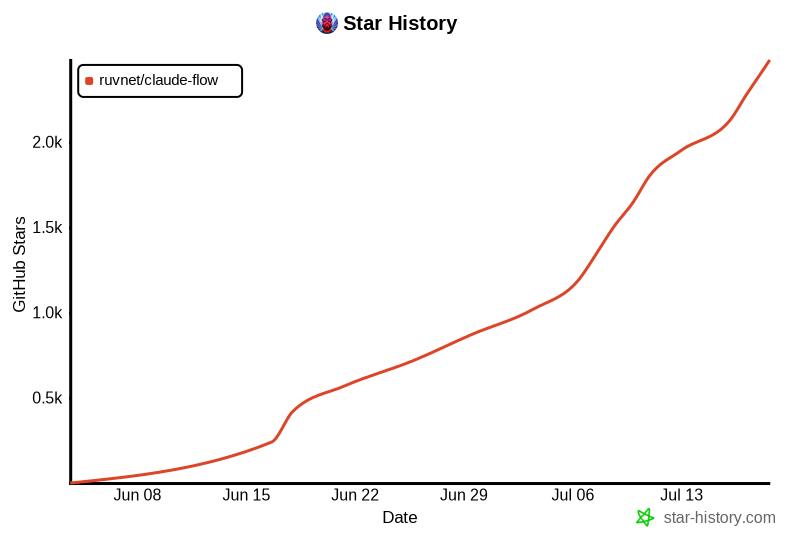
## Star History
 ---
**Built with ❤️ by [rUv](https://github.com/ruvnet) | Powered by Revolutionary AI**
*v2.0.0 Alpha - The Future of AI Orchestration*