mirror of
https://github.com/jhd3197/ServerKit.git
synced 2026-11-13 23:42:53 +09:00
 Juan DenisandClaude Opus 4.8
176141295f
Plan 47 Phase 6 (for shipped work). Sync the pre-bundled frontend plugin.json
copies for the four extracted builtins (entry_point/url_prefix + status
description) so builtin-extensions/ and frontend/src/plugins/ agree
(sync-builtin-frontends --check + test_extension_manifests green). Raise the
test-count ratchet 2588 -> 2623. Document the second-speed backend-extraction
recipe in EXTENSIONS.md, add CHANGELOG entries (wizard installs + opt-in
FTP/cloud/remote-access/status), and a README "lean by default" bullet.

Co-Authored-By: Claude Opus 4.8 (1M context) <noreply@anthropic.com>
631 lines
28 KiB
Markdown
631 lines
28 KiB
Markdown
<div align="center">
|
|
|
|
# ServerKit
|
|
|
|
<img width="100%" alt="ServerKit — Deploy, manage, and monitor servers" src="docs/screenshots/poster.png" />
|
|
|
|
**Deploy, manage, and monitor servers.**
|
|
|
|
A lightweight, modern server control panel for managing web apps, databases,
|
|
Docker containers, and security — without the complexity of Kubernetes
|
|
or the cost of managed platforms.
|
|
|
|
English | [Español](docs/README.es.md) | [中文版](docs/README.zh-CN.md) | [Português](docs/README.pt.md)
|
|
|
|
<br>
|
|
|
|

|
|

|
|
[](https://discord.gg/ZKk6tkCQfG)
|
|
|
|
[](https://github.com/jhd3197/ServerKit/stargazers)
|
|
[](LICENSE)
|
|
[](https://python.org)
|
|
[](https://reactjs.org)
|
|
[](https://flask.palletsprojects.com)
|
|
[](https://nginx.org)
|
|
[](https://letsencrypt.org)
|
|
|
|
<br>
|
|
|
|
[Features](#-features) · [Quick Start](#-quick-start) · [Screenshots](#-screenshots) · [Architecture](#-architecture) · [Roadmap](#-roadmap) · [Docs](#-documentation) · [Contributing](#-contributing) · [Discord](#-community)
|
|
|
|
</div>
|
|
|
|
---
|
|
|
|
<p align="center">
|
|
<img alt="Dashboard" width="100%" src="https://github.com/user-attachments/assets/e4382ba7-7b3f-4175-baaf-cc9c782de067" />
|
|
</p>
|
|
|
|
---
|
|
|
|
|
|
<!-- SK:SHOTS:START -->
|
|
## 📸 Screenshots
|
|
|
|
> Captured from a mock-data demo build — every hostname, IP, domain, and metric below is fictional.
|
|
|
|
<details open>
|
|
<summary><strong>Dashboard</strong> — Live server metrics, KPI cards, your apps at a glance, and a recent-activity feed</summary>
|
|
|
|

|
|
|
|
</details>
|
|
|
|
<details>
|
|
<summary><strong>AI Assistant</strong> — Built-in, Prompture-powered assistant — reads page context, answers questions, and runs tools on your infra</summary>
|
|
|
|

|
|
|
|
</details>
|
|
|
|
<details>
|
|
<summary><strong>Services</strong> — Static, Node.js, Python, PHP, and Docker apps with status, domain, and last-deploy</summary>
|
|
|
|

|
|
|
|
</details>
|
|
|
|
<details>
|
|
<summary><strong>Service Detail</strong> — Per-app deployments, git connection, live resource usage, logs, and settings</summary>
|
|
|
|

|
|
|
|
</details>
|
|
|
|
<details>
|
|
<summary><strong>WordPress</strong> — Per-site WordPress dashboard — status, core version, disk, DB config, Quick Actions, and live site-health checks</summary>
|
|
|
|

|
|
|
|
</details>
|
|
|
|
<details>
|
|
<summary><strong>Docker</strong> — Containers, images, volumes, and networks with live CPU/RAM per container</summary>
|
|
|
|

|
|
|
|
</details>
|
|
|
|
<details>
|
|
<summary><strong>Databases</strong> — MySQL / PostgreSQL / SQLite explorer with a live source tree and SQL console</summary>
|
|
|
|

|
|
|
|
</details>
|
|
|
|
<details>
|
|
<summary><strong>SQL Console</strong> — Run SQL against any database from the browser with a live, typed results grid</summary>
|
|
|
|

|
|
|
|
</details>
|
|
|
|
<details>
|
|
<summary><strong>Domains</strong> — Domains mapped to sites with SSL status, expiry tracking, and auto-renew</summary>
|
|
|
|

|
|
|
|
</details>
|
|
|
|
<details>
|
|
<summary><strong>DNS Zones</strong> — Multi-provider DNS — Cloudflare, Route 53, DigitalOcean — with full record editing</summary>
|
|
|
|

|
|
|
|
</details>
|
|
|
|
<details>
|
|
<summary><strong>Monitoring</strong> — Live host gauges, threshold-based alert rules, delivery channels, and alert history</summary>
|
|
|
|

|
|
|
|
</details>
|
|
|
|
<details>
|
|
<summary><strong>Security</strong> — Security posture score, ClamAV malware scanning, file integrity, firewall, and Fail2Ban</summary>
|
|
|
|

|
|
|
|
</details>
|
|
|
|
<details>
|
|
<summary><strong>Backups</strong> — Scheduled app/database/file backups with S3/B2 remote sync and one-click restore</summary>
|
|
|
|

|
|
|
|
</details>
|
|
|
|
<details>
|
|
<summary><strong>Mail</strong> — Full mail stack — Postfix, Dovecot, OpenDKIM, SpamAssassin, Roundcube — with DKIM/SPF/DMARC</summary>
|
|
|
|

|
|
|
|
</details>
|
|
|
|
<details>
|
|
<summary><strong>Cron Jobs</strong> — Scheduled tasks with cron expressions, human-readable timing, and enable toggles</summary>
|
|
|
|

|
|
|
|
</details>
|
|
|
|
<details>
|
|
<summary><strong>File Manager</strong> — Browse, edit, and upload files from the browser with per-mount disk usage</summary>
|
|
|
|

|
|
|
|
</details>
|
|
|
|
<details>
|
|
<summary><strong>Logs & Terminal</strong> — In-browser log viewer, process list, journald, and full SSH terminal sessions</summary>
|
|
|
|

|
|
|
|
</details>
|
|
|
|
<details>
|
|
<summary><strong>Servers</strong> — Manage every server from one panel with live CPU/RAM/disk telemetry per host</summary>
|
|
|
|

|
|
|
|
</details>
|
|
|
|
<details>
|
|
<summary><strong>Agent Fleet</strong> — Fleet health, agent version distribution, staged rollouts, and command queue</summary>
|
|
|
|

|
|
|
|
</details>
|
|
|
|
<details>
|
|
<summary><strong>Remote Access</strong> — Expose a private/NAT-ed home service publicly by WireGuard-pairing two agents — no port forwarding</summary>
|
|
|
|

|
|
|
|
</details>
|
|
|
|
<details>
|
|
<summary><strong>Workflow Builder</strong> — Node-based visual automation — chain triggers, builds, deploys, and notifications on a canvas</summary>
|
|
|
|

|
|
|
|
</details>
|
|
|
|
<details>
|
|
<summary><strong>Marketplace</strong> — Browse and install extensions from the bundled catalog or the remote registry — with a unified Installed tab</summary>
|
|
|
|

|
|
|
|
</details>
|
|
|
|
<details>
|
|
<summary><strong>Settings</strong> — Profile, security, appearance/branding, users, connections, and notification channels</summary>
|
|
|
|

|
|
|
|
</details>
|
|
|
|
<details>
|
|
<summary><strong>Login</strong> — Email/password sign-in with SSO (Google/GitHub/GitLab) and 2FA support</summary>
|
|
|
|

|
|
|
|
</details>
|
|
<!-- SK:SHOTS:END -->
|
|
|
|
## 🎯 Features
|
|
|
|
### 🚀 Apps & Deployment
|
|
|
|
**PHP / WordPress** — PHP-FPM 8.x with one-click WordPress installation
|
|
|
|
**Python Apps** — Deploy Flask and Django with Gunicorn
|
|
|
|
**Node.js** — PM2-managed applications with log streaming
|
|
|
|
**Manual & Zip Deploys** — Deploy from a local/manual path or a zip upload, alongside Git and Docker sources
|
|
|
|
**Workflow Builder** — Node-based visual automation for server tasks, deployments, and CI/CD
|
|
|
|
**Environment Pipeline** — Multi-environment management for WordPress (Prod/Staging/Dev) with code/DB promotion
|
|
|
|
**WordPress Publishing** — Publish managed sites at a real subdomain (not `localhost:port`), safely swap a site's URL with preview, and attach a custom domain with automatic DNS and wildcard HTTPS
|
|
|
|
**Docker** — Full container and Docker Compose management with real-time log streaming and terminal access
|
|
|
|
**Container Lifecycle** — Image-update detection with one-click apply, auto-sleep for idle containers, and CPU-driven horizontal auto-scaling
|
|
|
|
**Marketplace** — Over 60+ one-click templates for popular apps (Immich, Ghost, Authelia, etc.)
|
|
|
|
**Build Packs** — Zero-Dockerfile detection that inspects a repo and generates a Dockerfile + compose from a build plan (defers to an author-provided Dockerfile when present)
|
|
|
|
**Declarative Templates** — A documented catalog schema with auto-resolved `${SERVICE_*}` magic variables (password/user/FQDN/URL/base64) so templates never hardcode generated secrets or hosts
|
|
|
|
**Projects & Environments** — Group applications into a Workspace → Project → Environment hierarchy with workspace-scoped access and resource counts
|
|
|
|
**Config Snapshots** — Immutable, secret-masked configuration snapshots captured before each deploy, with diff and one-click restore + redeploy
|
|
|
|
**Container Status** — One deterministic health status per app, aggregated from its containers and pushed live (healthy / degraded / restarting / unhealthy)
|
|
|
|
**PR Preview Environments** — Ephemeral previews driven by a pull-request webhook that open, redeploy, and tear down per PR
|
|
|
|
### 🏗️ Infrastructure
|
|
|
|
**Domain Management** — Nginx virtual hosts with easy configuration
|
|
|
|
**DNS Zone Management** — Full DNS record management with propagation checking (A, AAAA, CNAME, MX, TXT, CAA, etc.)
|
|
|
|
**Dynamic DNS** — Token-authenticated A/AAAA updates for home servers and changing IPs, synced through your DNS provider
|
|
|
|
**SSL / TLS** — Automatic Let's Encrypt with auto-renewal, optional (best-effort) HTTPS that never blocks an install, hardened TLS 1.2+/AEAD ciphers, Cloudflare-aware configs, and automatic CAA records
|
|
|
|
**Databases** — MySQL/MariaDB and PostgreSQL with user management and query interface
|
|
|
|
**Cloud Provisioning** — Provision servers on DigitalOcean, Hetzner, Vultr, and Linode with cost tracking
|
|
|
|
**Connections** — One place to link every external account: source (GitHub/GitLab), cloud infrastructure, DNS providers, domain registrars with expiry tracking, SMTP relays, and S3/B2 storage — credentials encrypted at rest
|
|
|
|
**Firewall** — UFW/firewalld with visual rule management and port presets
|
|
|
|
**Cron Jobs** — Schedule tasks with a visual editor
|
|
|
|
**File Manager** — Browse, edit, upload, and download files via web interface, including browsing and previewing S3 / Backblaze B2 buckets
|
|
|
|
**FTP Server** — Manage vsftpd users and access
|
|
|
|
**Backup & Restore** — Automated backups to S3, Backblaze B2, or local storage with scheduling, retention policies, one-click restore, and optional client-side encryption
|
|
|
|
**Secrets & Webhook Gateway** — Encrypted secrets store plus an inbound webhook gateway for triggering automation from external events
|
|
|
|
**Email Server** — Postfix + Dovecot with DKIM/SPF/DMARC, SpamAssassin, Roundcube webmail, email forwarding rules
|
|
|
|
### 🔒 Security
|
|
|
|
**Two-Factor Auth** — TOTP-based with backup codes
|
|
|
|
**Passkeys / WebAuthn** — Passwordless and second-factor sign-in with hardware keys, Touch ID, and Windows Hello
|
|
|
|
**Web Application Firewall** — Per-app ModSecurity v3 + OWASP Core Rule Set with detect/block modes, tunable paranoia, and audit-log events
|
|
|
|
**Malware Scanning** — ClamAV integration with quarantine
|
|
|
|
**File Integrity Monitoring** — Detect unauthorized file changes
|
|
|
|
**Fail2ban & SSH** — Brute force protection, SSH key management, IP allowlist/blocklist
|
|
|
|
**Vulnerability Scanning** — Lynis security audits with reports and recommendations
|
|
|
|
**Container CVE Scanning & SBOM** — Per-image vulnerability scanning with grype and software bill-of-materials generation with syft
|
|
|
|
**Encrypted Secrets at Rest** — Provider credentials and system-setting secrets sealed with Fernet encryption
|
|
|
|
**Automatic Updates** — unattended-upgrades / dnf-automatic for OS-level patching
|
|
|
|
### 🖥️ Multi-Server Management
|
|
|
|
**Agent-Based Architecture** — Cross-platform Go agent (Linux, Windows, macOS) with HMAC-SHA256 authentication and a real-time WebSocket gateway (with HTTP-poll fallback). Native Windows service + MSI installer, plus `.deb`/`.rpm` and ARM64 builds. See [agent/README.md](agent/README.md).
|
|
|
|
**Fleet Management** — Agent inventory, connection status, approval queue, rollouts, LAN auto-discovery (UDP), and command queue
|
|
|
|
**Windows Desktop Agent** — Native Windows service plus an optional desktop app: WebView2 console, system-tray controls, and a guided pairing wizard for one-click enrollment
|
|
|
|
**Agent Enrollment** — Two ways to adopt a server: a secure short-code pairing flow (type a rotating code + passphrase into the panel and verify the key fingerprint) or a pre-shared registration token; host credentials are stored AES-GCM-encrypted. See [docs/pairing.md](docs/pairing.md)
|
|
|
|
**Fleet Monitor** — Cross-server heatmaps, metric comparison charts, alert thresholds, anomaly detection, and capacity forecasting
|
|
|
|
**Agent Plugins** — Extensible plugin system with capabilities, permissions, and per-server installation
|
|
|
|
**Server Templates** — Configuration templates with compliance tracking, drift detection, and auto-remediation
|
|
|
|
**Remote Docker** — Agent-backed Docker operations for connected servers; remote app/site deployment is still evolving
|
|
|
|
**Remote Service Tunnels** — Expose a private or NAT'd service (e.g. a home media server) through an edge server over an agent-managed WireGuard tunnel, reusing nginx, DNS, and certificates
|
|
|
|
**API Key Rotation** — Secure credential rotation with acknowledgment handshake
|
|
|
|
**Server Onboarding** — A guided onboarding state machine (validate → install prerequisites → install Docker → pair agent → ready) driven on the job bus with a live progress log
|
|
|
|
**Per-Server Proxy Stack** — Opt-in Dockerized Traefik or Caddy per server with a compose preview before switching; host nginx remains the default
|
|
|
|
**Cross-Server Metrics** — Historical metrics with comparison charts and retention policies
|
|
|
|
### 📊 Monitoring & Alerts
|
|
|
|
**Real-time Metrics** — CPU, RAM, disk, network monitoring via WebSocket
|
|
|
|
**GPU Monitoring** — NVIDIA GPU utilization, memory, temperature, and power, with per-process and per-container usage
|
|
|
|
**Uptime Tracking** — Historical server uptime data and visualization
|
|
|
|
**Status Pages** — Public status pages with HTTP/TCP/DNS/Ping health checks, component monitoring, and incident management
|
|
|
|
**Notifications** — Discord, Slack, Telegram, email (HTML templates), and generic webhooks
|
|
|
|
**Per-User Preferences** — Individual notification channels, severity filters, and quiet hours
|
|
|
|
### 👥 Team & Access Control
|
|
|
|
**Multi-User** — Admin, developer, and viewer roles with team invitations
|
|
|
|
**Workspaces** — Multi-tenant workspace isolation with quotas and member management
|
|
|
|
**RBAC** — Granular per-feature permissions (read/write per module)
|
|
|
|
**SSO & OAuth** — Google, GitHub, OpenID Connect, and SAML 2.0 with account linking
|
|
|
|
**Audit Logging** — Track all user actions with detailed activity dashboard
|
|
|
|
**API Keys** — Tiered API keys (standard/elevated/unlimited) with rate limiting, usage analytics, and OpenAPI documentation
|
|
|
|
**API Token Scopes** — Fine-grained, additive scopes for API keys (enforced for programmatic `X-API-Key` callers; JWT/session users stay RBAC-governed)
|
|
|
|
**Shared Resources** — Polymorphic tags and attachable shared variable groups with a merged "resolved" view and masked secrets
|
|
|
|
**Webhook Subscriptions** — Event-driven webhooks with HMAC signatures, retry logic, and custom headers
|
|
|
|
### 🎨 Customization
|
|
|
|
**Lean by default** — The guided setup wizard installs only the extensions matched to the use cases you pick (WordPress, web apps, self-hosting, DevOps) and nothing else. Uncheck anything you don't want; add more anytime from Extensions. WordPress is offered at setup rather than force-installed.
|
|
|
|
**Sidebar Presets** — Switch between Full, Web Hosting, Email Admin, DevOps, and Minimal views with one click
|
|
|
|
**Collapsible Navigation** — Sidebar groups auto-expand on navigation and collapse when switching sections
|
|
|
|
**Accent Colors** — 8 preset accent colors plus custom hex picker
|
|
|
|
**Custom Branding** — White-label the sidebar with your own logo, brand name, or full-width banner
|
|
|
|
**Dashboard Widgets** — Toggle and reorder dashboard widgets to fit your workflow
|
|
|
|
---
|
|
|
|
## 🚀 Quick Start
|
|
|
|
> ⏱️ Up and running in under 2 minutes
|
|
|
|
### Option 1: One-Line Install (Recommended)
|
|
|
|
```bash
|
|
curl -fsSL https://serverkit.ai/install.sh | bash
|
|
```
|
|
|
|
> Works on Ubuntu 22.04+, Debian 12+, Fedora, and RHEL/Rocky/AlmaLinux 9+. Sets up everything automatically.
|
|
>
|
|
> Optional: `PANEL_DOMAIN=panel.example.com` sets the domain and tries Let's Encrypt; `SERVERKIT_OFFLINE_TARBALL=...` installs from a local tarball.
|
|
|
|
### Update
|
|
|
|
```bash
|
|
sudo serverkit update
|
|
```
|
|
|
|
Atomic blue/green update with pre-flight checks, DB backup, migration, and
|
|
automatic rollback. Use `--dry-run` to preview, `--branch dev` for dev builds,
|
|
or `--release [version]` for release tarballs.
|
|
|
|
### Option 2: Docker
|
|
|
|
```bash
|
|
git clone https://github.com/jhd3197/ServerKit.git
|
|
cd ServerKit
|
|
cp .env.example .env # then edit .env with your secrets
|
|
docker compose up -d # access at http://localhost
|
|
```
|
|
|
|
### Option 3: Manual Installation
|
|
|
|
See the [Installation Guide](docs/INSTALLATION.md) for step-by-step instructions.
|
|
|
|
### Requirements
|
|
|
|
| | Minimum | Recommended |
|
|
|---|---------|-------------|
|
|
| **OS** | Ubuntu 22.04 LTS | Ubuntu 24.04 LTS |
|
|
| **CPU** | 1 vCPU | 2+ vCPU |
|
|
| **RAM** | 1 GB | 2+ GB |
|
|
| **Disk** | 10 GB | 20+ GB |
|
|
| **Docker** | 24.0+ | Latest |
|
|
|
|
---
|
|
|
|
## 📸 Screenshots
|
|
|
|
<p align="center">
|
|
|
|

|
|
|
|
</p>
|
|
|
|
<details>
|
|
<summary><strong>View More Screenshots</strong></summary>
|
|
|
|
<br>
|
|
|
|
<p align="center">
|
|
<img alt="Docker" width="100%" src="https://github.com/user-attachments/assets/08fd47b9-778a-4170-8542-ed28579f8a12" />
|
|
</p>
|
|
|
|
<p align="center">
|
|
<img width="100%" alt="Workflow Builder" src="https://github.com/user-attachments/assets/1271f01d-f666-4609-8bc0-22a22c81eaf3" />
|
|
</p>
|
|
|
|
<p align="center">
|
|
<img width="100%" alt="Templates" src="https://github.com/user-attachments/assets/337bcf4a-d5aa-4496-b74a-b66e859304ad" />
|
|
</p>
|
|
|
|
<p align="center">
|
|
<img width="100%" alt="Applications" src="https://github.com/user-attachments/assets/b5bdf80c-4ce1-4de9-b8b9-ae069a17a2b3" />
|
|
</p>
|
|
|
|
<p align="center">
|
|
<img width="100%" alt="Applications Logs" src="https://github.com/user-attachments/assets/3c397d1e-1452-4111-baae-452fb7bfbed7" />
|
|
</p>
|
|
|
|
</details>
|
|
|
|
---
|
|
|
|
## 🏗️ Architecture
|
|
|
|
```
|
|
┌──────────────────┐
|
|
│ INTERNET │
|
|
└────────┬─────────┘
|
|
│
|
|
▼
|
|
┌──────────────────────────────────────────────────────────────────────────┐
|
|
│ YOUR SERVER │
|
|
│ │
|
|
│ ┌─────────────────────────────────────────────────────────────────────┐ │
|
|
│ │ NGINX (Reverse Proxy) │ │
|
|
│ │ :80 / :443 │ │
|
|
│ │ │ │
|
|
│ │ app1.com ──┐ app2.com ──┐ api.app3.com ──┐ │ │
|
|
│ └───────────────┼─────────────────┼─────────────────────┼─────────────┘ │
|
|
│ │ proxy_pass │ proxy_pass │ proxy_pass │
|
|
│ ▼ ▼ ▼ │
|
|
│ ┌─────────────────────────────────────────────────────────────────────┐ │
|
|
│ │ DOCKER CONTAINERS │ │
|
|
│ │ │ │
|
|
│ │ ┌───────────┐ ┌───────────┐ ┌───────────┐ │ │
|
|
│ │ │ WordPress │ │ Flask │ │ Node.js │ ... │ │
|
|
│ │ │ :8001 │ │ :8002 │ │ :8003 │ │ │
|
|
│ │ └─────┬─────┘ └───────────┘ └───────────┘ │ │
|
|
│ └──────────┼──────────────────────────────────────────────────────────┘ │
|
|
│ │ │
|
|
│ ▼ │
|
|
│ ┌─────────────────────────────────────────────────────────────────────┐ │
|
|
│ │ DATABASES │ │
|
|
│ │ MySQL :3306 PostgreSQL :5432 Redis :6379 │ │
|
|
│ └─────────────────────────────────────────────────────────────────────┘ │
|
|
└──────────────────────────────────────────────────────────────────────────┘
|
|
```
|
|
|
|
**[View Full Architecture Documentation →](docs/ARCHITECTURE.md)** — Request flow, template system, port allocation, database linking, and troubleshooting.
|
|
|
|
---
|
|
|
|
## 🗺️ Roadmap
|
|
|
|
- [x] Core infrastructure — Flask + React + JWT + WebSocket
|
|
- [x] Application management — PHP, Python, Node.js, Docker
|
|
- [x] Domain & SSL — Nginx virtual hosts, Let's Encrypt
|
|
- [x] Databases — MySQL, PostgreSQL
|
|
- [x] File & FTP management
|
|
- [x] Monitoring & alerts — Metrics, webhooks, uptime tracking
|
|
- [x] Security — 2FA, ClamAV, file integrity, Fail2ban, Lynis
|
|
- [x] Firewall — UFW/firewalld integration
|
|
- [x] Multi-server monitoring — Go agent, centralized dashboard
|
|
- [x] Git deployment — Webhooks, auto-deploy, rollback, zero-downtime
|
|
- [x] Backup & restore — S3, Backblaze B2, scheduled backups
|
|
- [x] Email server — Postfix, Dovecot, DKIM/SPF/DMARC, Roundcube
|
|
- [x] Team & permissions — RBAC, invitations, audit logging
|
|
- [x] API enhancements — API keys, rate limiting, OpenAPI docs, webhook subscriptions
|
|
- [x] SSO & OAuth — Google, GitHub, OIDC, SAML
|
|
- [x] Database migrations — Flask-Migrate/Alembic, versioned schema
|
|
- [x] Agent fleet management — Version rollouts, approval queue, discovery, command queue
|
|
- [x] Cross-server monitoring — Fleet heatmaps, comparison charts, anomaly detection, capacity forecasting
|
|
- [ ] Remote app/site deployment through connected agents
|
|
- [x] Agent plugin system — Extensible agent with capabilities, permissions, per-server install
|
|
- [x] Server templates & config sync — Drift detection, compliance dashboards, auto-remediation
|
|
- [x] Multi-tenancy — Workspaces with quotas, member management, isolation
|
|
- [x] DNS zone management — Full record management with propagation checking
|
|
- [x] Status pages — Public status pages with health checks, incident management
|
|
- [x] Cloud provisioning — DigitalOcean, Hetzner, Vultr, Linode with cost tracking
|
|
- [x] Customizable sidebar — Collapsible groups, view presets, accent colors, white-label branding
|
|
- [x] Web Application Firewall — Per-app ModSecurity v3 + OWASP CRS
|
|
- [x] Container security — Image CVE scanning (grype) + SBOM (syft)
|
|
- [x] Passwordless auth — WebAuthn / passkeys
|
|
- [x] Dynamic DNS — Token-authenticated A/AAAA updates
|
|
- [x] GPU monitoring — NVIDIA utilization, memory, and processes
|
|
- [x] Container lifecycle — Image-update apply, auto-sleep, horizontal auto-scaling
|
|
- [x] TLS hardening — Optional HTTPS, Cloudflare-aware configs, automatic CAA
|
|
- [x] Secrets manager & inbound webhook gateway
|
|
- [x] Remote access — Expose private/NAT'd services via agent-managed WireGuard tunnels
|
|
- [x] Connections hub — Unified external accounts (source, cloud, DNS, registrars, SMTP, storage)
|
|
- [x] WordPress publishing — Real subdomains, URL-swap, custom domains, wildcard HTTPS
|
|
|
|
Full details: [ROADMAP.md](ROADMAP.md)
|
|
|
|
---
|
|
|
|
## 📖 Documentation
|
|
|
|
| Document | Description |
|
|
|----------|-------------|
|
|
| [Architecture](docs/ARCHITECTURE.md) | System design, request flow, diagrams |
|
|
| [Installation Guide](docs/INSTALLATION.md) | Complete setup instructions |
|
|
| [Deployment Guide](docs/DEPLOYMENT.md) | CLI commands and production deployment |
|
|
| [Agent](agent/README.md) | Install & run the multi-server agent (Linux/Windows/macOS) |
|
|
| [Agent Pairing](docs/pairing.md) | Secure short-code agent enrollment |
|
|
| [API Reference](docs/API.md) | REST API endpoints |
|
|
| [New Features](docs/NEW_FEATURES.md) | Endpoint & page reference for the latest `dev` features |
|
|
| [Enhancements](docs/ENHANCEMENTS.md) | Guide to the ten developer-experience, team/scale, fleet, and security capabilities |
|
|
| [Changelog](CHANGELOG.md) | Release history and notable changes |
|
|
| [Roadmap](ROADMAP.md) | Development roadmap and planned features |
|
|
| [Contributing](CONTRIBUTING.md) | How to contribute |
|
|
|
|
---
|
|
|
|
## 🧱 Tech Stack
|
|
|
|
| Layer | Technology |
|
|
|-------|------------|
|
|
| Backend | Python 3.11, Flask, SQLAlchemy, Flask-SocketIO, Flask-Migrate |
|
|
| Frontend | React 18, Vite, SCSS, Recharts |
|
|
| Database | SQLite / PostgreSQL |
|
|
| Web Server | Nginx, Gunicorn (GeventWebSocket) |
|
|
| Containers | Docker, Docker Compose |
|
|
| Security | ClamAV, Lynis, Fail2ban, ModSecurity v3 + OWASP CRS, grype, syft, TOTP (pyotp), Fernet encryption |
|
|
| Auth | JWT, OAuth 2.0, OIDC, SAML 2.0, WebAuthn / passkeys |
|
|
| Email | Postfix, Dovecot, SpamAssassin, Roundcube |
|
|
| Agent | Go (multi-server), HMAC-SHA256, WebSocket |
|
|
|
|
---
|
|
|
|
## 🤝 Contributing
|
|
|
|
Contributions are welcome! Please read [CONTRIBUTING.md](CONTRIBUTING.md) first.
|
|
|
|
```
|
|
fork → feature branch → commit → push → pull request
|
|
```
|
|
|
|
**Priority areas:** Cloud provider integrations, marketplace extensions, UI/UX improvements, documentation, test coverage.
|
|
|
|
---
|
|
|
|
## 🔭 Related Projects
|
|
|
|
**[Faro](https://github.com/jhd3197/faro)** — A modern desktop client for SFTP, FTP, SSH, and S3-compatible storage, from the same author. Save a server once, then browse its files in a dual-pane view and open a terminal against the same SSH session — plus drag-and-drop transfers, one-way directory sync, and edit-in-place. It even has an **Agent Bridge** that lets Claude Code (or any MCP agent) run commands on a box through your authenticated session, with per-command approval and no shared credentials.
|
|
|
|
> ServerKit manages your servers from the browser; Faro is the desktop companion for hands-on file transfer, shells, and ad-hoc work across all your boxes. [Grab a build →](https://github.com/jhd3197/faro/releases/latest)
|
|
|
|
---
|
|
|
|
## 💬 Community
|
|
|
|
[](https://discord.gg/ZKk6tkCQfG)
|
|
|
|
Join the Discord to ask questions, share feedback, or get help with your setup.
|
|
|
|
---
|
|
|
|
## ⭐ Star History
|
|
|
|
[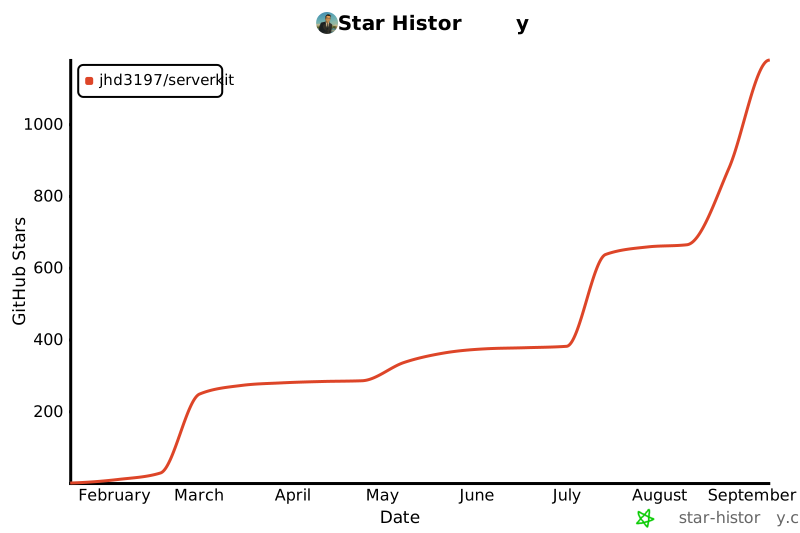](https://star-history.com/#jhd3197/ServerKit&Date)
|
|
|
|
---
|
|
|
|
<div align="center">
|
|
|
|
**ServerKit** — Simple. Modern. Self-hosted.
|
|
|
|
[Report Bug](https://github.com/jhd3197/ServerKit/issues) · [Request Feature](https://github.com/jhd3197/ServerKit/issues)
|
|
|
|
Made with ❤️ by [Juan Denis](https://juandenis.com)
|
|
|
|
</div>
|